What your smart TV sends home — and how to turn ACR off
Modern TVs identify what is on the screen and report it to the manufacturer. The feature has a different name on every brand, and switching it off breaks nothing.
Setting up a new TV means walking through a handful of consent screens, and most people press “next” through all of them. One of those screens is the one that turns on a feature that identifies what appears on your screen and reports it to the manufacturer.
This is not a conspiracy theory. It is a documented feature, and you can switch it off in the settings. The reason people don’t is that they don’t know what it is called.
What ACR is
ACR — Automatic Content Recognition — is a technique where the TV takes a fingerprint of the video currently on screen and matches it against a database.
The important part is that it does not care about the input source.
- Broadcast channels
- Streaming apps
- Anything over HDMI — a games console, a set-top box, a laptop screen
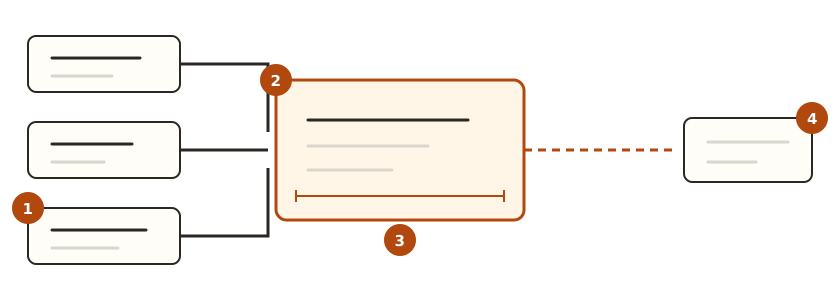
① Broadcast, streaming apps, and anything over HDMI. ② They all land on the same screen. ③ The screen is what gets fingerprinted. ④ The result goes to the manufacturer.
Whether you are watching cable or playing a console game, if it is on the TV’s screen it is in scope. The resulting data feeds viewing-habit analysis and, mainly, targeted advertising. The adverts on your TV’s home screen are what it produces.
Every brand calls it something different
It is the same feature under a different name each time, which is the single biggest reason people can’t find it.
| Brand | What to look for in the settings |
|---|---|
| Samsung | Viewing Information Services |
| LG | Live Plus, and the personalised-advertising setting |
| Sony and other Android TVs | Usage & Diagnostics, Ads personalisation |
| Roku | Smart TV experience |
| Vizio | Viewing Data |
| Amazon Fire TV | App usage data collection, interest-based ads |
It generally sits near Settings → General / Privacy / Terms & Policies. Find the screen where the consent items are gathered together.
The order to switch things off
The exact path differs by model, but the sequence is the same everywhere.
- Go to Settings → Privacy, or Terms & Policies
- Find the item matching your brand in the table above and withdraw consent
- If there is a separate personalised / interest-based advertising item on the same screen, turn that off too
- If you don’t use voice control, turn off voice data collection while you are there
- If the option exists, reset the advertising ID. That breaks the link to the profile built so far
Switching it off does not break the TV
This is the worry that stops most people. With ACR off, broadcast reception, streaming apps and HDMI inputs all carry on working exactly as before.
Two things change.
- Recommendations on the home screen become less personalised
- Adverts are less targeted — they do not disappear. The advertising slots remain
Nothing stops working.
If you already clicked through the setup
Agreeing to everything in the setup wizard is not permanent. Follow the same steps above to withdraw it.
One thing to watch: the consent screens sometimes reappear after a software update. When the terms change the TV asks again, and pressing “agree” without reading brings the feature back. It is worth a check after any large update.
If the settings don’t feel like enough
Turning the setting off is asking the manufacturer not to send it. What actually leaves the TV can only be seen on the network.
There are two network-level approaches.
- Put the TV on the guest network — that separates it from everything else in the house, and on most routers it is a few clicks
- Block the manufacturer’s telemetry domains at the DNS level — Pi-hole, NextDNS and similar. It applies to the whole house at once
The second has a side effect. Block too broadly and the app store or some streaming apps stop working along with the telemetry. Expect to start wide and narrow it down when something breaks.
The most reliable approach is not connecting the TV to the internet at all and using a separate streaming device. Bear in mind that the streaming device collects the same class of data — the problem moves rather than disappears.
In short
| Question | Answer |
|---|---|
| Does the TV identify what’s on screen | Yes. It’s called ACR and it’s documented |
| Does that include HDMI inputs | Yes. Consoles and set-top boxes included |
| Can it be turned off | Yes. The name just differs by brand |
| Is the TV worse with it off | Recommendations are less personalised. Features are unchanged |
| Do the adverts go away | No. They are just less targeted |
| Are the settings enough on their own | They are a request. For certainty, handle it on the network |
When you set up a new TV, not pressing “next” quickly through the wizard solves most of this on its own. The consent screens come up perhaps three times, and turning it off there is far easier than hunting through menus later.