What a VPN actually hides — and what it leaves in plain sight
A VPN closes one stretch of the road between you and the internet. It also opens a new window onto you somewhere else. Here is which is which.
VPN adverts nearly all use the same picture: a hooded figure, a padlock, and the phrase “be anonymous online”. What that phrase does is overstate what a VPN does and quietly omit what it doesn’t.
A VPN is a genuinely useful tool. It is just useful for something other than what the advert implies.
In one sentence
A VPN conceals one stretch of the path between you and the internet, and installs a new observer at the point where that stretch ends.
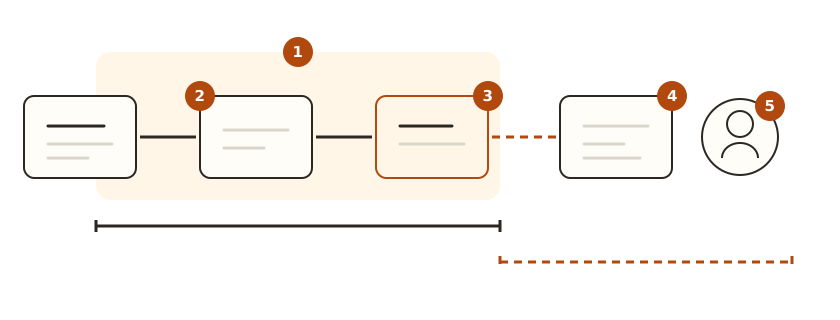
① This stretch is encrypted. ② Your ISP sees only “connected to a VPN”. ③ The VPN provider sees the original traffic here. ④ The destination site sees the VPN server’s IP. ⑤ The moment you log in, the site knows exactly who you are.
What a VPN really does hide
It hides your destinations from your ISP and from anyone else on the same line. Café Wi-Fi, hotel networks, an office connection — any network run by somebody else is where the benefit is largest.
It hides your real IP address from the sites you visit. They see the VPN server’s address instead, so your apparent location changes. That property is what gets used to work around regional restrictions.
It stops other people on the same public Wi-Fi from looking over your shoulder. This matters less than it used to, though — almost the entire web is HTTPS now, so the contents are already encrypted without a VPN. What the VPN adds is cover for where you went, not what was said.
What it does not hide
This is the part the advert leaves out.
Accounts you are logged into. Search while signed into Google and Google knows who you are, VPN or no VPN. An account is a far stronger identifier than an IP address.
Browser fingerprinting. Screen size, installed fonts, time zone, the way your graphics stack renders — combine enough of those and you are narrowed down considerably. A VPN has no effect on any of it.
Cookies. Tracking cookies already sitting in your browser do not disappear because you turned on a VPN.
Malware and phishing. A VPN encrypts the tunnel; it does not inspect what travels through it. A malicious file downloaded over an encrypted tunnel arrives perfectly safely.
The VPN provider itself. The view you took away from your ISP has moved here. If you don’t trust your ISP and use a VPN because of it, you now have to trust the VPN provider instead.
About the words “no logs”
Almost every provider says it keeps no logs. There is no way for a user to verify that claim directly.
Two signals do carry some weight.
- An independent audit report — an outside accounting or security firm inspecting the actual server configuration. Look for the report itself being published, not a sentence about it on a marketing page
- A record of what happened when law enforcement asked — court documents showing the provider had nothing to hand over
With neither of those, “no logs” is a promise and nothing more.
Why free VPNs are a bad trade
Servers and bandwidth cost money. If the user isn’t paying, the money comes from somewhere else, and for free services that somewhere is usually injected advertising, traffic analysis, or selling the data.
Which means you switched it on to stop your ISP seeing where you go, and handed that same view to a company under far less regulatory scrutiny.
So when is it worth using
| Situation | Does a VPN help |
|---|---|
| Café, hotel, airport Wi-Fi | Yes — it hides your destinations from whoever runs the line |
| Region-restricted content | Yes — though check the service’s terms |
| You dislike your ISP logging your browsing | Partly — the view moves to the VPN provider |
| You want to stop ad tracking | No — cookies and fingerprinting are untouched |
| You want to be anonymous | No — logging in ends that immediately |
| Protection from malware and phishing | No — it encrypts the tunnel, nothing else |
If ad tracking is what you’re after
There are far more direct tools for that, and most of them are free.
- Turn your browser’s tracking protection up to its strict setting
- Install a content blocker
- Block ad and tracking domains at the network level (Pi-hole, NextDNS and similar)
The third is particularly efficient because it applies to every device in the house at once. That one deserves its own article.
In short
A VPN is a privacy tool for one stretch of network. It is not an anonymity tool, not a security product, and not a tracker blocker.
If you regularly use other people’s Wi-Fi, it earns its subscription. If your aim is to stop ad tracking on your own connection at home, that subscription is money spent somewhere the problem isn’t.