Before you mount a security camera — where the video ends up decides everything else
Mounting it takes an afternoon. What you cannot undo is whether the footage stays in your house or piles up on a company server, and that is settled before you buy.
Putting a camera in your home is a different kind of decision from the rest. If a smart plug leaks, what you lose is a record of when something was switched on. A camera leaks your living room.
So this is not an installation guide. Drilling into the wall takes an afternoon and can be undone. What cannot be undone is settled before you buy.
Decide one thing and the rest follows
Where does the video end up? That one question settles the cost, the privacy, and what happens on the day the thing breaks.
| Stored at home | Stored on company servers | |
|---|---|---|
| Where video lives | SD card, NAS, a dedicated recorder | The company cloud |
| Monthly cost | None | Usually a subscription |
| Watching from elsewhere | Needs setting up | Straight from the app |
| Can the company see it | No | Structurally, yes |
| If the service shuts down | You carry on using it | Features shrink or stop |
| If the camera is stolen | The recordings can walk out with it | They are still there |
Both sides have a case and there is no single right answer. The row most people skip is can the company see it.
What “encrypted” actually covers
Cloud products nearly all advertise encryption. What matters is from where to where.
- Encrypted in transit — covers the stretch from your house to the server. Once it arrives, it is readable
- Encrypted at rest — written to disk under a lock. But if the company holds the key, the company can open it
- End-to-end encrypted — the key lives only on your device. The company cannot look
Some products do offer the third. It is often not the default, and switching it on costs you features. Viewing in a browser stops working, or the motion analysis does. On a product page, do not stop at the word encryption. Find out who holds the key.
What is left if you do not subscribe
Also worth settling before you pay. Without a subscription, products land in one of these.
- Live view only, no recording
- Recording, but only a few days of it
- Motion alerts arrive, but you cannot watch the clip they refer to
People mount cameras mostly to check something later — and when that part sits behind the subscription, the reason you bought it is rented rather than owned. Subscription cost times years of use often exceeds the price of the camera.
Where it goes in the house
Less discussed than the technical setup, and more consequential.
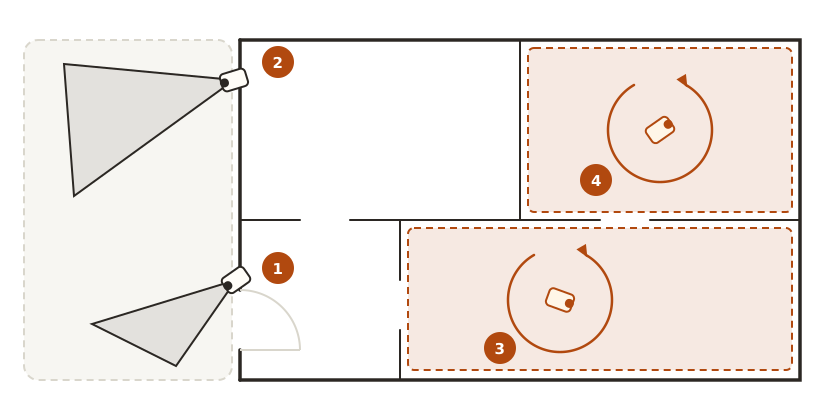
① A camera aimed at the front door. ② One covering the yard. Both look in a direction you chose. ③ A pan camera in the living room and ④ one in a child’s room turn left and right, so the whole room is the field of view.
- Facing outward, at a door or a driveway, is what this device is for
- Pointing into a living room or bedroom deserves a second thought. Family gets filmed far more often than an intruder does
- A child’s room is worth running back through the table above, even when the product is sold for exactly that
Most indoor models turn. Close to 300 degrees of pan is common, and a motion sensor swings the lens toward whatever moved. So “I will just angle it away from the sofa” does not hold. Treat it as handing over a whole room rather than choosing an angle.
Products do offer ways to narrow that down. How much of it survives once the camera has rotated differs by product, so it belongs on the list of things to check.
- Privacy zones — black out part of the frame. The question is whether the mask follows the lens after it turns
- Off while you are home — switches automatically on your phone location. The condition is that your location keeps being sent
- A lens cover — physically blocks it. The most reliable and the most tedious
If you live with other people, telling them where it goes comes before any of the technical settings.
On the network side
Two things once the camera is in the house.
Put it on the guest network. If the camera is compromised, it does not spread to everything else in the house. Some models need the phone app on the same network to finish the initial pairing, so pair it on the main network and move it afterwards.
Watch what it sends. Video is not the only thing leaving. Usage data goes too, and DNS blocking can cut some of that, but blocking the video upload itself breaks the product, so a broad block is the wrong tool here.
And if UPnP is on, the camera may open its own door facing outward. Look at the port forwarding list once it is installed.
Check before you buy
| What to check | Why |
|---|---|
| Where the video ends up | Every other condition follows from this |
| Does it record without a subscription | If not, the reason you bought it is rented |
| Is end-to-end encryption there, and is it the default | Encrypted does not mean the company cannot look |
| What stops working when you enable it | Usually remote viewing or analysis |
| Can the pan and motion tracking be switched off | If not, no mounting angle hides anything |
| Is there a lens cover or a true off switch | The surest way to be off while you are home |
| What happens to the camera if the service ends | Some of them brick |
| Can you export footage | You need to get it out when it matters |
In short
| Question | Answer |
|---|---|
| First thing to settle | Whether video stays home or lands on a company server |
| Does installation difficulty matter | No. It can be undone |
| Is encrypted the same as safe | It depends who holds the key |
| Is the subscription optional | On some products the recording itself is tied to it |
| Which network | Guest. Pair on the main one first |
| Can I point it indoors | Mostly it films your family, and a model that pans sees the whole room |
A camera is the hardest device in the house to undo. Pull a plug and it is over — video is already sitting somewhere. One row of that table, read before you drill, is worth a lot of later regret.