What a guest network actually does — it is for your devices, not your guests
The name misleads. Its real use is keeping your smart devices away from everything else in the house. In exchange, some things stop working.
There is a setting on your router called guest network. The name makes it easy to skip, sounding like something for households that have visitors often, when the thing it actually earns its keep on is not guests at all. It is devices.
If you have opened your device list and watched the smart plugs and bulbs scroll past, this is the next part of that story.
Being on the same Wi-Fi means seeing each other
The moment devices join the same Wi-Fi they are in a position to see one another. That is why your laptop finds the printer and your phone finds the TV. It is a convenient property and most of the time it causes no trouble.
The trouble is when that list includes a device from a manufacturer you have never heard of. A cheap smart plug may have gone years without a firmware update. If one of those is compromised, whoever did it is already standing inside your home network. What they can see from there is your laptop, your NAS and your printer.
A guest network cuts that line of sight. Devices on it get the internet, and nothing else in the house.
Turning it on
In the admin page, look for one of these.
- Wireless settings → Guest Network
- Wireless → Multiple SSID
Give it its own name and password and you are done. That part is easy — but without one more setting, it is only half on.
The one setting you must check
On the same screen there will be something called:
- Client isolation
- AP isolation
- Device-to-device blocking
If that is off, devices on the guest network can still see each other. They are separated from your main network, but the IoT devices you gathered there are still sitting in one room together. If isolating smart devices is the point, this is the switch that makes the result match the intention.
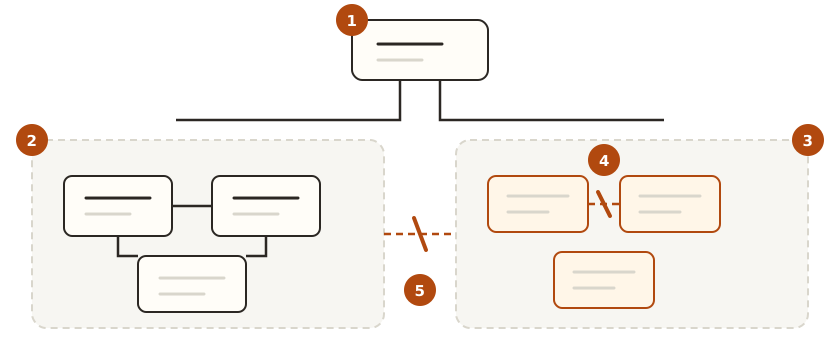
① One router serves both. ② On the main network, devices see each other, which is what makes printers and casting work. ③ The guest network holds the devices you never operate directly. ④ Client isolation stops even those from seeing each other. ⑤ Across the two, nothing gets through.
Some models don’t offer it at all. If yours doesn’t, take its guest network as doing the “separate from main” half and no more.
Some things will stop working
This is the part that actually inconveniences people. Separation cuts convenience features along with the risk.
- Casting from your phone to the TV stops. On different networks they cannot find each other
- Printers don’t show up
- Smart home apps can’t find devices — especially during first-time setup, where many products require the app and the device to be on the same network
- On some routers the guest network is 2.4GHz only, so 5GHz-only devices won’t join at all
So “put all the IoT on the guest network” is not always the right answer. It is more practical to split by whether you ever operate the thing directly.
What goes where
| Device | Where | Why |
|---|---|---|
| Laptops, phones, NAS, printer | Main | They need to see each other to be useful |
| Smart TV | Guest | If you don’t cast to it, separating is better |
| Smart plugs, bulbs, sensors | Guest | Once registered, control goes via the maker’s servers |
| Robot vacuum, air purifier | Guest | Same as above |
| Visitors’ devices | Guest | The original purpose |
With a fair number of products you can do the initial setup on the main network and move the device to the guest network afterwards. The same-network requirement often applies only while pairing.
One distinction worth keeping. A guest network separates devices from each other; it does not stop a device reporting to its manufacturer. That is what DNS filtering is for, and the two are used together.
The separate password is worth more than it looks
This is the part that helps most often in ordinary life.
Change your main password and every device in the house has to be reconnected. Eight bulbs means eight times. Which is why, even when you should change it, you put it off.
A guest network splits the password you change from the password you keep. Change the one you gave out, and leave everything in the house alone. It makes responding to an unknown device on your list far lighter work.
The order to do it in
- Turn the guest network on and give it a different password from your main one
- On the same screen, turn on client isolation
- Move devices over one at a time, starting with the ones you never operate directly. Move them all at once and you won’t know what caused what
- Use it for a few days, and move anything that broke back to main
In short
| Question | Answer |
|---|---|
| No visitors — do I need it | Yes. The value is in isolating IoT |
| What gets separated | Guest devices cannot see main devices |
| Is turning it on enough | No. Client isolation has to be on too |
| What stops working | Casting, printers, smart home pairing |
| Move everything over | No. Start with what you never touch |
| Can I undo it | Yes. Reconnect the device to main |
It is already in your router and turning it on takes a few clicks. Keeping the flimsiest device in the house from standing next to the most important one — that is the single thing a guest network does.